
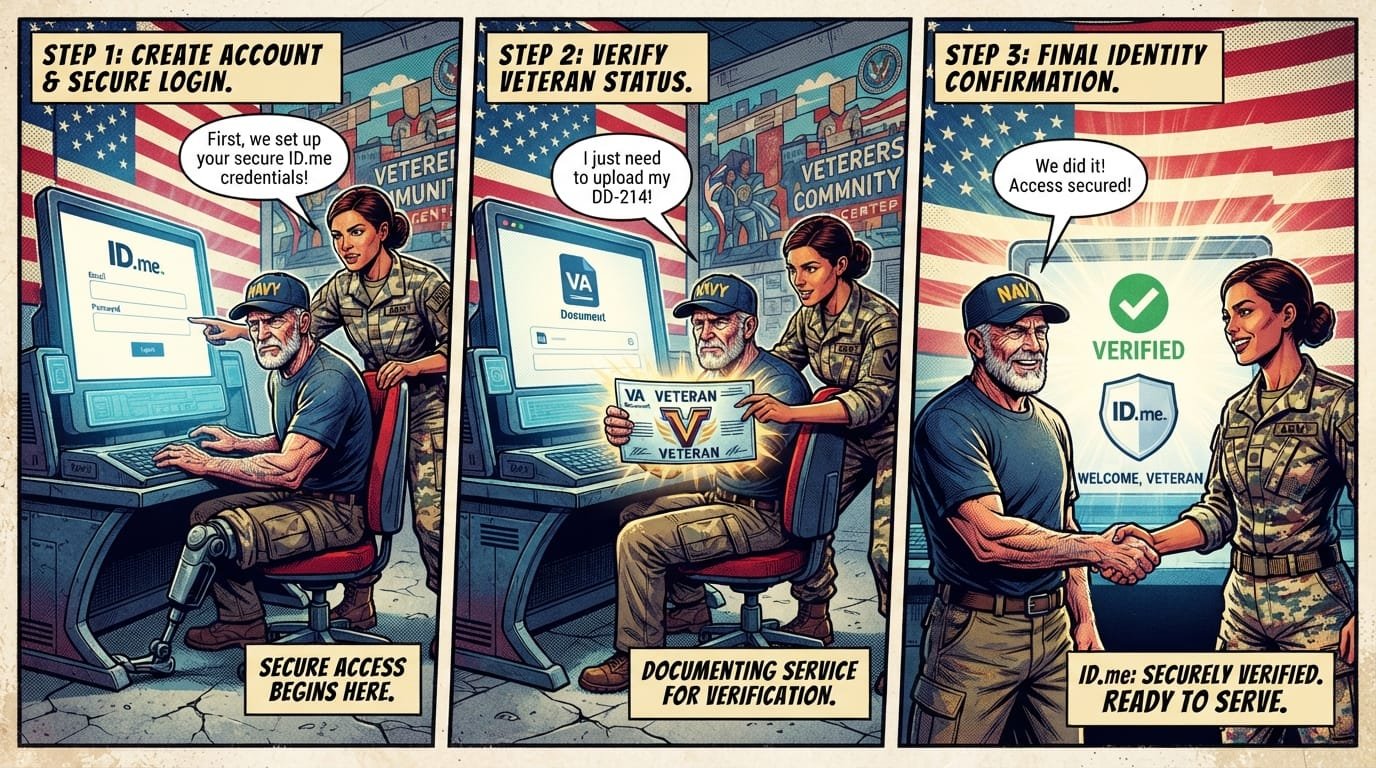
A Step-by-Step Guide to Logging Into the LSGS Veteran Portal with ID.me
To log into the LSGS Veteran Portal with ID.me, go to the official LSGS portal website, select the ID.me sign-in option, enter your ID.me email and password, and complete multifactor authentication. If you don’t have an ID.me account, create one first by verifying your identity with a government-issued photo ID and your Social Security number.
| Item | Details |
|---|---|
| Portal | LSGS Veteran Portal (operated by Loyal Source Government Services) |
| Purpose | Schedule Compensation & Pension (C&P) exams, manage VA disability claims |
| Authentication | ID.me or Login.gov credential required |
| Eligibility | Veterans with active VA disability claims requiring C&P exams |
| Account Creation | Create ID.me account or Login.gov account; verify identity online, via video call, or in person |
| Required Documents | Government-issued photo ID, Social Security number, valid email, phone number |
| Official Agency | U.S. Department of Veterans Affairs (contractor-supported) |
| Updated For | 2026 |
What Is the LSGS Veteran Portal?
The LSGS Veteran Portal is an online platform operated by Loyal Source Government Services (LSGS), a federal contractor that has worked with the VA since 2009. The portal helps veterans schedule Compensation and Pension (C&P) exams and manage aspects of their VA disability claims.

What it is: A digital scheduling and claims management portal for veterans with active VA disability claims.

Who qualifies: Veterans who have filed VA disability compensation claims that require C&P exams. LSGS handles exam scheduling after you file a claim with the VA.
Why it matters: C&P exams are medical evaluations conducted by VA-contracted examiners to assess the severity of service-connected conditions. These exams directly determine your VA disability rating, which affects your monthly compensation. Without scheduling and completing your C&P exam, your claim cannot move forward.
What veterans should do next: If you have an active VA disability claim, register for the LSGS Veteran Portal and set up your ID.me or Login.gov account to manage your appointments.
Why ID.me Is Required for LSGS Portal Access
ID.me is a digital identity verification service that confirms you are who you claim to be before granting access to government systems. The LSGS portal uses ID.me as its secure sign-in partner to protect your personal and health information.
What ID.me Does
Verifies your identity using government-issued documents
Provides multifactor authentication (MFA) to prevent unauthorized access
Creates a single secure credential you can use across multiple government platforms
Protects sensitive data like your Social Security number and medical information
ID.me vs. Login.gov
Veterans May Qualify for Extra Benefits
Check available financial assistance, healthcare programs and other opportunities that may apply to you.
Check EligibilityThe VA now offers two sign-in account options: ID.me and Login.gov. Both meet federal security standards. However, ID.me is required in certain situations:
| Situation | Use ID.me | Use Login.gov |
|---|---|---|
| You live outside the U.S. | Yes | No |
| You don’t have a Social Security number | Yes | No |
| You don’t have an unexpired driver’s license or state ID | Yes | No |
| Your phone is on a plan not in your name and you want to complete the process online | Yes | No |
| You have standard U.S. identification and a phone in your name | Either works | Either works |
What veterans should do next: Determine which account type fits your situation. If you have a U.S. driver’s license, a phone in your name, and a Social Security number, either option works. If any of the ID.me-specific situations apply to you, choose ID.me.
Step-by-Step: Creating Your ID.me Account for the LSGS Portal
You must create and verify your ID.me account before you can log into the LSGS Veteran Portal. Follow these steps in order.
Step 1: Gather Your Documents
Before starting, have these items ready:
Government-issued photo ID — driver’s license, state ID, U.S. passport, or passport card
Social Security number
Valid email address (use a unique, personal email, not a shared one)
Mobile phone with a camera (for online verification)
U.S. phone number on a plan in your name (or you may need to wait for a mailed letter)
Step 2: Create Your ID.me Account
Go to the official LSGS Veteran Portal website or ID.me directly.
Select Sign Up or Create an ID.me Account.
Enter your personal email address and create a strong password.
Confirm your email address by clicking the link ID.me sends you.
Set up multifactor authentication (MFA). Add at least one method — a 6-digit code by text or phone call is most common. Add two methods if possible in case you lose access to one.
Step 3: Verify Your Identity
ID.me offers three verification options:
Option A: Self-service online (fastest)
Upload images of your valid, unexpired driver’s license, state ID, or passport
Enter your Social Security number
Take a selfie for biometric verification
Available instantly if your phone is on a plan in your name
Option B: Video call with an ID.me representative
Upload certain ID documents (ID.me will tell you which types)
Show your documents and answer questions on a live video call
Option C: In person at a participating UPS Store
Book an appointment or start the walk-in process online
Bring your ID.me-provided QR code and your ID documents
Wait 24 hours after in-person verification to confirm your account
Step 4: Verify Your Military Status (If Required)
Depending on the services you access, ID.me may ask you to verify your military status separately. You can:
Enter your service information for automatic verification against Department of Defense databases
Upload a military document such as your DD-214
Use your .mil email address if still active
Document uploads are typically reviewed within 60 seconds at a secure U.S.-based facility.
Step-by-Step: Logging Into the LSGS Veteran Portal with ID.me
Once your ID.me account is created and verified, follow these steps to log into the LSGS Veteran Portal.
Step 1: Navigate to the Portal
Open your web browser and go to the official LSGS Veteran Portal website. Be cautious of lookalike websites. Only use the URL provided in your VA correspondence or from official VA.gov resources.
Step 2: Select ID.me as Your Sign-In Method
On the portal login page, look for the Sign In or Log In button. Select ID.me from the available authentication options. If you already have a Login.gov account, you can use that instead, but ID.me is the more common choice for veterans.
Step 3: Enter Your ID.me Credentials
You will be redirected to the ID.me sign-in screen. Enter:
Your email address (this is your ID.me username)
Your password
Select Sign In.
Step 4: Complete Multifactor Authentication
ID.me will send a 6-digit code to your registered phone number via text message or phone call. Enter the code on the screen to complete sign-in. If you don’t receive the code, select the option to try a different MFA method you may have set up.
Step 5: Access Your Dashboard
After successful authentication, you will be redirected to your LSGS Veteran Portal dashboard. From here, you can:
View scheduled, planned, and completed C&P appointments
Reschedule or cancel appointments
Upload documentation related to your claim
Track claim progress
Receive notifications from the VA
What You Can Do on the LSGS Portal
The LSGS Veteran Portal provides a centralized dashboard for managing your VA disability claim and C&P exam process.
| Feature | What It Does |
|---|---|
| Appointment Scheduling | View and manage C&P exam appointments |
| Appointment History | See completed, scheduled, and planned exams |
| Document Upload | Submit supporting documentation for your claim |
| Claim Tracking | Monitor the status of your disability claim |
| Notifications | Receive updates from the VA and LSGS |
| Secure Messaging | Communicate with claims processors and case managers |
Key point: The LSGS Portal is specifically for C&P exam scheduling and claim management. It is not a replacement for VA.gov. For other VA benefits — like disability compensation payments, health care enrollment, GI Bill benefits, or VA home loans — you should use VA.gov with the same ID.me credential.
Troubleshooting Common Login Problems
You Forgot Your ID.me Password
Go to the ID.me sign-in page.
Select Forgot password?
Enter your email address.
Check your email for a password reset link.
Create a new strong password.
You Forgot Your ID.me Username
Your ID.me username is your email address. If you don’t remember which email you used, try the most likely addresses. You can also contact ID.me support for account recovery assistance.
Your MFA Code Isn’t Arriving
Confirm your phone number is correct in your ID.me account settings.
Try selecting a different MFA method (phone call instead of text, or an authenticator app if you set one up).
Check that your phone has signal and can receive messages.
If you’ve lost access to your MFA device, you may need to verify your identity again through ID.me.
You Get an Error Message When Signing In
Clear your browser cache and cookies, or try a different browser.
Disable browser extensions that might interfere with the sign-in process.
Ensure you are on the official LSGS portal website, not a lookalike.
Try signing in on a mobile device versus a computer.
You’re Locked Out of Your Account
If you’ve entered incorrect credentials too many times, your account may be temporarily locked. Wait 30 minutes and try again, or use the password reset option. If the problem persists, contact ID.me support.
Contact Information
| Resource | Contact |
|---|---|
| LSGS Portal Support | Contact via the portal’s help section or the number provided in your exam scheduling notice |
| ID.me Support | Available through the ID.me Help Center |
| VA Benefits | 1-800-827-1000 |
| VA Health Care | 1-877-222-8387 |
What to Do If You Don’t Have an ID.me Account Yet
If you are trying to access the LSGS Portal but don’t have an ID.me account, you cannot log in until you create and verify one. The LSGS Portal does not create accounts for you; you must set up your ID.me credential through the VA or ID.me directly.
Quick Decision Tree
Do you have an ID.me account?
Yes → Verify it is identity-verified, then log in to the LSGS Portal.
No → Create one now. You will need a government-issued photo ID, Social Security number, valid email, and phone.
Can you verify online?
Yes (you have a state ID/passport and phone in your name) → Use self-service online verification.
No (you lack a state ID or your phone is not in your name) → Use video call or in-person verification at a UPS Store.
Are you outside the U.S.?
Common Mistakes with LSGS Portal and ID.me Login
Mistake 1: Using the wrong website. Always verify you are on the official LSGS Veteran Portal. Lookalike sites can steal your credentials.
Mistake 2: Creating an ID.me account with a shared or incorrect email. Your ID.me username is your email. Use a unique personal email you control.
Mistake 3: Skipping multifactor authentication setup. MFA is required for both ID.me and Login.gov. If you don’t set it up, you cannot complete verification.
Mistake 4: Assuming ID.me verification is instant. Self-service online verification can be instant if your information matches government records. However, video calls and in-person verification take longer. In-person verification requires a 24-hour wait after the visit.
Mistake 5: Not verifying military status separately. Creating an ID.me account does not automatically verify your veteran status. You may need to complete a separate military verification step.
Mistake 6: Trying to log in before verifying your ID.me account. You must complete identity verification before your ID.me account will work on the LSGS Portal.
Mistake 7: Using an expired ID. Your driver’s license, state ID, or passport must be valid and unexpired. Expired documents will fail verification.
Mistake 8: Forgetting to log out. Always log out of the LSGS Portal after each session, especially on shared or public devices.
LSGS Portal and VA Benefits: What Else You Can Access
Your ID.me credential is not limited to the LSGS Portal. The same ID.me account can be used across VA.gov and other VA online services to manage:
VA disability compensation — view your rating, payment history, and dependent information
VA health care — manage appointments, prescriptions, and secure messages
GI Bill education benefits — track your remaining entitlement and enroll in courses
VA home loan guaranty — obtain your Certificate of Eligibility (COE)
Dependency and Indemnity Compensation (DIC) — for surviving spouses
VA pension — for low-income wartime veterans
What veterans should do next: Once your ID.me account is verified, explore VA.gov using the same credential. You may discover benefits you are eligible for but haven’t yet claimed.
Latest Changes Affecting VA Sign-In
DS Logon retirement: After September 30, 2025, veterans have two secure sign-in options for VA.gov and VA mobile apps: Login.gov or ID.me. DS Logon is no longer accepted as a primary sign-in method.
Real-time eligibility verification: Providers can verify CHAMPVA and VA eligibility electronically through EDI systems using VA’s real-time payer ID (VAHAC). This streamlines the process for veterans and family members.
Caregiver Support Program expansion: VA has expanded coverage for medical services, including mental health care, for family members and Primary Family Caregivers participating in the Caregiver Support Program.
Community Care integration: The LSGS Portal continues to integrate with VA Community Care programs to streamline C&P exam scheduling and claims management for veterans nationwide.
Common Questions
What is the LSGS Veteran Portal?
The LSGS Veteran Portal is an online platform operated by Loyal Source Government Services, a VA contractor. It helps veterans schedule Compensation and Pension (C&P) exams and manage aspects of their VA disability claims. The portal provides appointment scheduling, claim tracking, and document upload features.
Why do I need ID.me to log into the LSGS Portal?
ID.me verifies your identity before granting access to the LSGS Portal, which contains sensitive personal and health information. The LSGS portal uses ID.me as its secure sign-in partner. You cannot access the portal without an identity-verified ID.me or Login.gov account.
How do I create an ID.me account for the LSGS Portal?
Go to ID.me or the LSGS Portal, select Sign Up, enter your personal email and create a password, confirm your email, set up multifactor authentication, and then verify your identity by uploading a government-issued photo ID and entering your Social Security number.
What documents do I need for ID.me verification?
You need a valid, unexpired government-issued photo ID (driver’s license, state ID, or passport), your Social Security number, a valid personal email address, and a phone number on a plan in your name for self-service online verification.
Can I use Login.gov instead of ID.me for the LSGS Portal?
Yes, if you have a U.S. driver’s license or state ID and a phone in your name. However, if you live outside the U.S., don’t have a Social Security number, or lack a U.S. state ID, you must use ID.me.
What is the LSGS Portal used for?
The LSGS Portal is used to schedule and manage Compensation and Pension (C&P) exams, upload documentation for your VA disability claim, track claim progress, and receive notifications from the VA and LSGS.
How long does ID.me verification take?
Self-service online verification can be instant if your information matches government records. Video call verification takes as long as the call. In-person verification at a UPS Store requires a 24-hour wait after your visit.
What should I do if I forgot my ID.me password?
Go to the ID.me sign-in page, select “Forgot password?”, enter your email address, and check your email for a password reset link. Create a new strong password. Your ID.me username is your email address.
Why isn’t my MFA code arriving?
Confirm your phone number is correct in your ID.me account, check that your phone has signal, and try selecting a different MFA method. If you’ve lost access to your MFA device, you may need to reverify your identity through ID.me.
Can I access other VA benefits through the LSGS Portal?
No. The LSGS Portal is specifically for C&P exam scheduling and VA disability claim management. For other VA benefits, use VA.gov with the same ID.me credential. VA.gov provides access to disability compensation, health care, GI Bill, VA home loans, and more.
What is a C&P exam?
A Compensation and Pension (C&P) exam is a medical evaluation conducted by a VA-contracted examiner to assess the severity of your service-connected conditions. C&P exams are critical to determining your VA disability rating and monthly compensation amount.
What if I don’t have a C&P exam scheduled yet?
LSGS handles C&P exam scheduling after you file a VA disability claim. If you haven’t filed a claim yet, start by submitting VA Form 21-526EZ. Once the VA determines an exam is needed, LSGS will contact you to schedule it.
Key Takeaways
The LSGS Veteran Portal is operated by Loyal Source Government Services, a VA contractor, and is used to schedule C&P exams and manage VA disability claims.
ID.me or Login.gov is required to log in. You cannot access the portal without an identity-verified account.
Creating an ID.me account requires a government-issued photo ID, Social Security number, valid email, and phone number.
ID.me offers three verification options: self-service online, video call, or in-person at a UPS Store.
The LSGS Portal lets you view scheduled, planned, and completed C&P appointments, upload documents, and track claim progress.
Use the same ID.me credential on VA.gov to manage disability compensation, health care, GI Bill, and VA home loans.
Common login problems include forgotten passwords, MFA code delays, and account lockouts. Use password reset or contact ID.me support.
Always use the official LSGS portal website. Lookalike sites can steal your credentials.
Multifactor authentication is mandatory. Set up at least one MFA method, preferably two.
Log out after each session to protect your personal information, especially on shared devices.
Official Resources
VA Sign-In Information: https://www.va.gov/sign-in/
ID.me Help Center: https://help.id.me/
VA Disability Compensation: https://www.va.gov/disability/
VA Form 21-526EZ (Disability Compensation Claim): https://www.va.gov/find-forms/about-form-21-526ez/
VA Benefits Hotline: 1-800-827-1000
VA Health Care: 1-877-222-8387
USA.gov Veterans Benefits: https://www.usa.gov/veterans-benefits
A Step-by-Step Guide to Logging Into the LSGS Veteran Portal with ID.me
To log into the LSGS Veteran Portal with ID.me, go to the LSGS portal login page, select “Sign in with ID.me,” enter your ID.me email and password, and complete multifactor authentication (MFA). If you haven’t verified your identity, you will need to upload a government-issued ID, provide your Social Security number, and confirm your personal information before accessing veteran services.
Quick Facts
| Item | Details |
|---|---|
| Portal | LSGS (Logistics Support Generation System) Veteran Portal |
| Sign-in Partner | ID.me (digital identity verification service) |
| Primary Use | Access logistics support, benefits information, and veteran services |
| Account Required | ID.me account with identity verification |
| Multifactor Authentication | Required for all sign-ins |
| Verification Documents | U.S. driver’s license, state ID, or passport |
| Processing Time | Identity verification typically takes 5-10 minutes online |
| Cost | Free |
| Updated For | July 2026 |
What Is the LSGS Veteran Portal?
The Logistics Support Generation System (LSGS) is a digital platform designed to support veterans by providing access to essential logistics and support services within military and veteran affairs . The LSGS Veteran Portal serves as the primary gateway through which veterans can navigate the system’s services, including documentation, application processes, and support channels .
Why it matters: The LSGS portal centralizes access to important veteran resources and services. Understanding how to navigate the portal—and how to authenticate your identity through ID.me—is essential for veterans seeking to use these services efficiently .
What Is ID.me and Why Does LSGS Use It?
ID.me is a digital identity verification platform that provides secure authentication for accessing government services, including the Department of Veterans Affairs (VA) and other federal agencies . The platform validates both legal identity and community status—such as veteran status—through real-time authoritative sources and document verification .
Why ID.me Is Required for LSGS
Security: Protects veteran information from unauthorized access and fraud
NIST Compliance: Meets federal security standards (IAL2/AAL2) for identity verification
Streamlined Access: Allows veterans to use one verified credential across multiple government platforms
Identity Proofing: Prevents scammers from creating accounts in veterans’ names
ID.me verifies veteran status through authoritative sources like the VA, SCRA, and USAA, along with document review and government-issued ID verification . Once verified, veterans receive a credential in their ID.me Digital Wallet, allowing them to share verified community status across the ID.me network .
What You Need Before You Start
Before logging into the LSGS Veteran Portal, gather the following:
Required Items for ID.me Account Access
Your ID.me username (email address) and password
Access to your multifactor authentication (MFA) method (authentication app, mobile phone, or security key)
A valid, unexpired U.S. driver’s license, state-issued ID, or passport
Your Social Security number
A smartphone with a camera or a computer with internet access
If You Don’t Have an ID.me Account Yet
You must create an ID.me account and verify your identity before accessing LSGS. The process typically takes 5-10 minutes .
To create an ID.me account:
Visit ID.me or start from the LSGS portal’s sign-in page
Enter your email address and create a strong password
Set up multifactor authentication
Verify your identity by uploading a government-issued ID
Enter your Social Security number and personal information
If You Live Outside the U.S.
Veterans without a U.S. phone number or who live outside the United States can verify their identity through a video call with an ID.me agent instead of the self-service online option .
Step-by-Step Guide to Logging In
Step 1: Navigate to the LSGS Veteran Portal
Open your web browser and go to the official LSGS Veteran Portal website. Make sure you are on the legitimate portal to avoid phishing scams .
Step 2: Access the Login Page
On the LSGS portal homepage, locate and click the “Login” button—typically found in the upper right corner of the page .
Step 3: Select ID.me as Your Sign-in Provider
On the login page, select the option to sign in with ID.me. This will redirect you to the ID.me authentication page .
Step 4: Enter Your ID.me Credentials
On the ID.me sign-in page:
Step 5: Complete Multifactor Authentication (MFA)
After entering your password, complete the MFA step:
Enter the code from your authentication app
OR enter the code you received via text message
OR approve the sign-in through your mobile device
Step 6: Verify Your Identity (First-Time Users Only)
If you have not previously verified your identity with ID.me for the LSGS portal:
You will be prompted to verify your identity
Upload photos of your government-issued ID
Enter your Social Security number
Review and confirm your information
Step 7: Complete the Login
After successful authentication and any required verification, you will be redirected back to the LSGS Veteran Portal dashboard. You can now access the services and resources available through the portal .
Common Login Issues and Troubleshooting
Issue: Forgotten Password
If you forget your password, click the “Forgot Password?” link on the ID.me sign-in page. Follow the prompts to reset your password through your registered email address .
Issue: Not Receiving MFA Code
Check your cell signal or Wi-Fi connection
Wait up to 10 minutes for the code to arrive
Try using a different MFA method if you have multiple options set up
Ensure your phone number is still current in your ID.me account
Issue: Document Upload Fails
If ID.me cannot accept your ID photos:
Make sure the ID barcode is clean and undamaged
Take photos against a dark, solid background
Turn off your camera’s flash
Ensure the area is well-lit with no shadows
Hold your phone steady when taking the photo
If photos continue to fail, you can choose to verify your identity through a video call with an ID.me agent instead .
Issue: ID.me Says You Already Have an Account
If you receive a message that an account already exists with your email:
Select “Forgot Password” and follow the prompts to reset your password
If you still cannot access the account, contact ID.me support for help
Issue: Session Timed Out
If you receive an error or timeout message during verification:
Don’t worry. Close the browser tab
Open a new tab and sign in to the LSGS portal again
Your verification progress should not be lost
ID.me vs. Login.gov for Veteran Portals
VA now offers two online sign-in options: Login.gov and ID.me . While both meet federal security standards, there are differences:
| Feature | ID.me | Login.gov |
|---|---|---|
| Provider | Private company | U.S. government (GSA) |
| Verification Options | Online, video call, or in-person at UPS Store | Online or in-person at US Post Office |
| International Use | Available via video call | Limited; may require mail verification |
| Community Verification | Verifies veteran status, military affiliation | Basic identity verification only |
| Who Should Choose | Veterans outside U.S., those without SSN, those without U.S. phone plan | Most U.S.-based veterans with standard ID and phone |
Why ID.me matters for LSGS: ID.me verifies both identity AND veteran status, which may be required for accessing all LSGS services .
After You Log In: Navigating the LSGS Veteran Portal
Once successfully logged in, familiarize yourself with the portal dashboard:
Benefits Information: Access and manage veteran benefits applications
Resources: Find support services, documentation, and assistance programs
Profile Management: Update your contact information and service details
Support: Contact help desk for technical issues
The LSGS portal is typically divided into categories including benefits, resources, and support. Use the search function to quickly find specific information .
Common Questions
What is the LSGS Veteran Portal?
The LSGS (Logistics Support Generation System) Veteran Portal is an online platform designed to streamline logistics and support processes for veterans. It provides access to essential services, documentation, application processes, and support channels tailored to veterans’ needs .
Why do I need ID.me to access the LSGS portal?
ID.me provides secure identity verification required to protect veteran information from unauthorized access and fraud. It meets federal security standards and ensures that only authorized veterans can access sensitive services on the LSGS portal .
Do I already have an ID.me account?
If you have used ID.me to access VA.gov, My HealtheVet, or other government services, you already have an account. You can use the same credentials to log into the LSGS Veteran Portal. If you’re unsure, try creating a new account with your email—ID.me will notify you if an account already exists .
What documents do I need to verify my identity with ID.me?
You need a valid, unexpired U.S. driver’s license, state-issued ID, or passport. You also need your Social Security number and access to a smartphone or computer with a camera for document upload .
How long does ID.me verification take?
The online verification process typically takes 5-10 minutes. If you verify through a video call or in person at a UPS Store, the process may take longer .
What if I don’t have a smartphone or U.S. phone number?
You can verify your identity through a video call with an ID.me representative instead of the self-service online option. You’ll need to upload certain ID documents and show them during the video call .
Can I use the LSGS portal without ID.me?
No. The LSGS portal requires ID.me authentication for access. This ensures the security of veteran information and prevents unauthorized access to sensitive services .
What happens to My HealtheVet and DS Logon credentials?
As of 2025, VA transitioned from four sign-in options to two: Login.gov and ID.me. My HealtheVet credentials were removed January 31, 2025, and DS Logon was removed September 30, 2025. You must now use ID.me or Login.gov to access VA and veteran services .
What if I get an error message during verification?
If you receive an error message, close the browser tab, open a new one, and try signing in again. If the problem persists, you may need to verify your identity through a video call with ID.me support .
How do I reset my ID.me password?
Go to the ID.me sign-in page and select “Forgot Password.” Follow the prompts to reset your password through your registered email address. You may need your multifactor authentication method to complete the process .
Key Takeaways
The LSGS Veteran Portal requires ID.me for secure authentication. You must have a verified ID.me account to access veteran services on the portal .
ID.me verifies both identity and veteran status through real-time authoritative sources and document review .
To log in, go to the LSGS portal, select “Sign in with ID.me,” and enter your email, password, and complete multifactor authentication .
First-time users must verify their identity by uploading a government-issued ID, providing their Social Security number, and confirming personal information .
VA transitioned to ID.me and Login.gov as the only sign-in options. My HealtheVet and DS Logon credentials are no longer accepted .
Verification typically takes 5-10 minutes online. Veterans without a U.S. phone number can verify by video call .
Common login issues include forgotten passwords, MFA problems, and document upload failures. Each has straightforward solutions .
ID.me meets NIST federal security standards (IAL2/AAL2), protecting veteran information and benefits from fraud .
The LSGS portal centralizes access to veteran benefits, documentation, applications, and support channels .
Over 20 million individuals have verified their community status with ID.me, making it a trusted platform for veteran authentication .
Official Resources
ID.me Official Website: https://www.id.me
ID.me Help Center: https://help.id.me
VA.gov Sign-in Information: https://www.va.gov/resources/signing-in-to-vagov/
LSGS Veteran Portal: ID.me Login Guide 2026
The LSGS Veteran Portal is a dedicated online platform designed to provide veterans with essential resources and support services. Its primary purpose is to streamline the process through which veterans can access various benefits, information, and assistance related to their service. This portal serves as a vital tool, allowing veterans to manage their accounts, apply for benefits, and find information relevant to their needs.
One of the key features of the LSGS Veteran Portal is its comprehensive database of services available to veterans. These services may include healthcare support, educational resources, employment assistance, and housing programs. By logging into the portal, veterans can customize their experience based on their specific circumstances and requirements, thereby enhancing their ability to navigate the complexities of veteran services.
Moreover, accessing the LSGS Veteran Portal is crucial for veterans seeking timely assistance. The portal provides a centralized location where they can submit requests, track the status of claims, and communicate with relevant departments. In a landscape where information can be overwhelming, the portal simplifies access to necessary services, ensuring veterans receive the support they deserve.
To enhance security and protect sensitive personal information, the LSGS Veteran Portal employs ID.me as its authentication provider. This identity verification technology ensures a safe login process, allowing veterans to confidently manage their accounts without the fear of unauthorized access. By integrating ID.me, the LSGS Veteran Portal not only safeguards personal information but also enhances the overall user experience, facilitating a secure and efficient means to access vital resources.
Creating Your ID.me Account
Creating an account with ID.me is an essential step for accessing the LSGS Veteran Portal. This process typically involves several straightforward steps that ensure your identity is secure and accurately verified. To begin, navigate to the ID.me website and look for the registration button. You will be prompted to fill out essential information, including your name, email address, and a strong password. It is crucial to create a password that is not only unique but also complex enough to protect your account from unauthorized access.
Once you have entered the necessary information, you will receive an email verification link. Click on this link to confirm your email address, which is a vital part of the registration process. After verifying your email, the next step involves identity verification, where you will provide personal information such as your Social Security number and upload identification documents. ID.me takes this process seriously to ensure the accuracy of your verified status.
To enhance security, ID.me may offer additional features such as two-factor authentication (2FA). It is strongly recommended to enable these features, as they provide an extra layer of protection against potential fraud. Once your identity has been verified and all the security features have been addressed, you will gain access to the portal.
In summary, creating your ID.me account involves a series of steps focused on identity verification and security. This account is vital for seamlessly accessing the LSGS Veteran Portal, allowing veterans to take advantage of various services offered. By following the prescribed steps and paying close attention to security measures, you lay the groundwork for a safe and efficient online experience.
Steps to Log into the LSGS Veteran Portal Using ID.me
To begin the process of logging into the LSGS Veteran Portal, users must first ensure they have established their ID.me account. If you have not yet registered, visit the ID.me website and complete the sign-up process. Following this, you can proceed with the steps outlined below to successfully access the LSGS portal.
1. Visit the LSGS Veteran Portal: Open your preferred web browser and navigate to the official LSGS Veteran Portal homepage. It is important to ensure that you are accessing the correct website to avoid any potential security issues.
2. Select ID.me Login Option: On the login page, you will typically find multiple options for signing in. Choose the option that allows you to log in using ID.me. This selection is crucial as it links your credentials to your verified ID.me account.
3. Enter Your ID.me Credentials: You will be prompted to input your ID.me email and password. Make sure to enter your information accurately to prevent any login errors. If you have forgotten your password, follow the prompts to reset it via the ‘Forgot Password’ link.
4. Complete Two-Factor Authentication: For enhanced security, ID.me may require you to verify your identity through a two-factor authentication (2FA) process. This often involves a verification code sent to your registered phone number or email address. Make sure to have access to these devices during the login.
5. Troubleshooting Common Issues: If you encounter difficulties while logging in, such as incorrect password issues, double-check your credentials. Additionally, ensure that your internet connection is stable. If problems persist, consider clearing your browser cache or trying a different web browser. In extreme cases, contacting customer support may be necessary.
Following these steps will facilitate a smooth login experience for users accessing the LSGS Veteran Portal through ID.me.
Tips for Secure Access and Assistance
Ensuring secure access to the LSGS Veteran Portal is essential for the protection of personal information. Here are several strategies to enhance your account’s security while using the portal through ID.me.
First and foremost, utilize strong, unique passwords for your account. A robust password typically consists of a combination of uppercase and lowercase letters, numbers, and symbols. Avoid using easily guessed information such as birthdates or common words. Consider utilizing a password manager to securely store and generate complex passwords, thus making it easier to maintain strong password practices.
Secondly, be vigilant against phishing attempts. Scammers often impersonate legitimate organizations to obtain your login credentials. Be cautious of unsolicited emails or messages requesting personal information. Verify the sender’s email address and look for signs of suspicious activity, such as poor grammar or urgent demands for information. It is advisable to navigate directly to the LSGS Veteran Portal through a web browser instead of clicking on links in emails.
If you encounter any issues during your login process or need assistance, don’t hesitate to reach out to the support team. The LSGS Veteran Portal provides resources for users who face login challenges. Be sure to utilize official channels such as the contact numbers or help sections provided on the portal’s website. Avoid discussing your account issues in public forums or over social media to maintain your privacy.
Finally, regularly update your credentials and review account activity for any unauthorized actions. By following these tips, you can significantly enhance your security while accessing the LSGS Veteran Portal with ID.me, helping to ensure a safe and efficient experience.
🇺🇸 IMPORTANT DISCLAIMER – Veterans Benefits Information
This site provides general information about U.S. Department of Veterans Affairs (VA) benefits for educational and informational purposes only.
- Not Official: We are NOT affiliated with, endorsed by, or connected to the U.S. Department of Veterans Affairs (VA), the Veterans Benefits Administration (VBA), the Veterans Health Administration (VHA), or any other government agency.
- No Legal/Financial Advice: The content on this website is for informational purposes only and does not constitute legal, financial, or medical advice. VA benefits rules change frequently – always consult with an accredited Veterans Service Officer (VSO) or a qualified professional for your specific situation.
- Official Sources: For official, binding information and to apply for benefits, always visit official .gov websites: VA.gov, Benefits.VA.gov, or SSA.gov.
- No Data Collection: This site does not collect, store, or process any personal information. It does not have login forms, contact forms, or any system to capture user data. We never ask for your Social Security Number, bank details, or any personal information.
- 🚨 Scam Alert: The VA and other government agencies never charge fees for benefit applications. If anyone asks for money to "process" your VA claim, it is a scam. Report it to the VA Office of Inspector General at VA.gov/OIG.
- Advertising: This site uses third-party advertising (Adsterra) to cover operational costs. We do not endorse or guarantee any products or services advertised.
📌 Information provided as of June 2026. Always verify current eligibility and rules with official .gov sources.
This site is not affiliated with the U.S. Department of Veterans Affairs or any government agency. All information is for educational purposes only. Please visit VA.gov for official information.
