
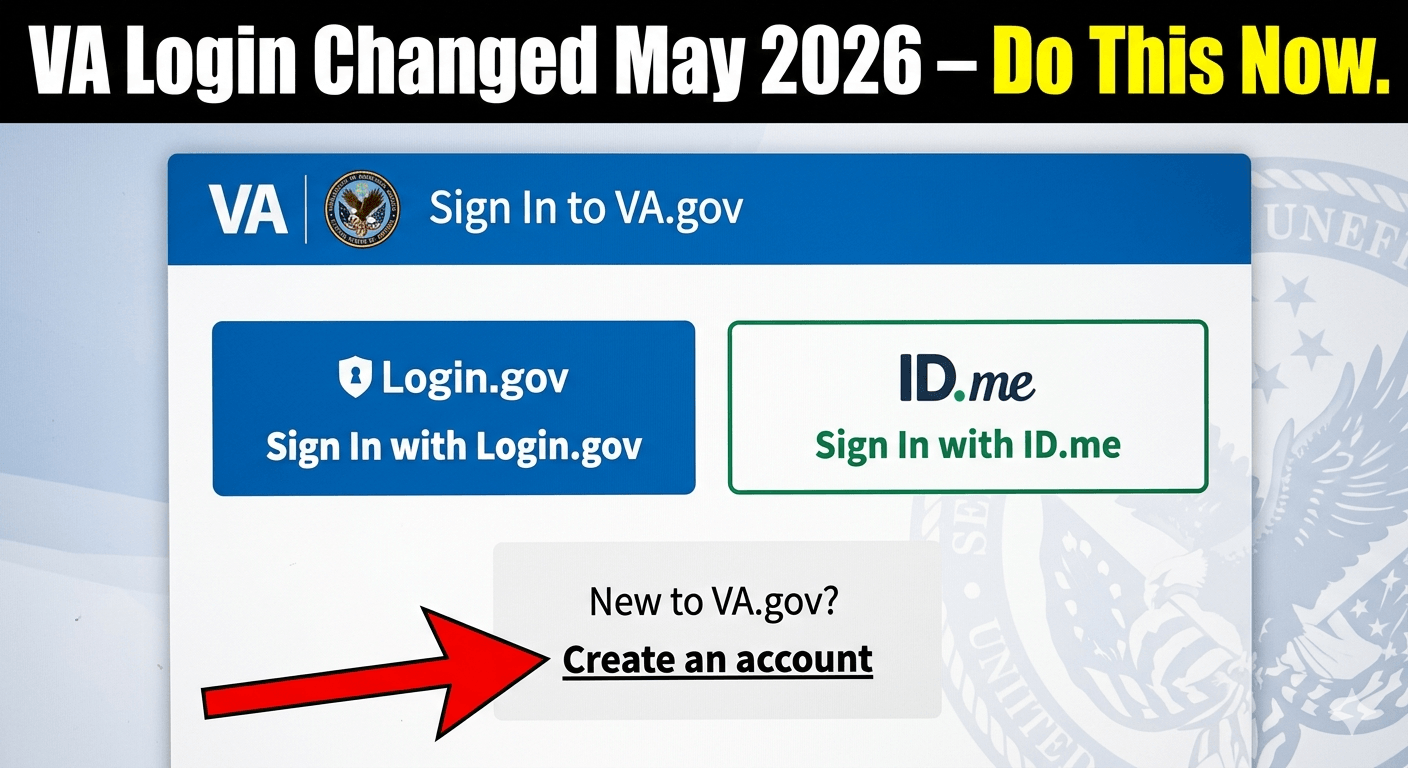
The way you log into your VA health portal just changed—again. As of May 2026, the VA health login now requires a “high-assurance” identity verification for all users accessing My HealtheVet, the VA Health Chat, and prescription refill tools. If you haven’t upgraded to Login.gov or ID.me with facial recognition or a video call, you will be blocked from seeing your doctor’s notes, messaging your care team, or picking up refills online.
What Veterans Need to Know Right Now

This isn’t a rumor. The VA finalized the deprecation of the old My HealtheVet username/password system. If you’ve been using the same simple login since 2018, your access is already limited or gone.

In real life for you and your family: that means no more quick refills at 10 p.m. No more secure messaging to ask about a rash on your child. And if you’re a caregiver managing a disabled veteran’s account, you are facing the same wall.
But there is good news. The fix is free. It takes 10 minutes. And once done, your VA health login is actually more secure against scammers—which is a huge problem right now. Fake “VA login help” sites are popping up on Google.
We’ll walk you through every step, the mistakes that lock your account for 72 hours, and exactly what the VA isn’t telling you on their hold music.
What Veterans Need to Know Right Now
The VA’s new “credentialing standard” went live in late April 2026. Here is the bullet-point reality:
- Old credentials: My HealtheVvet “premium” passwords are dead. You can’t create a new one.
- New mandatory methods: Login.gov (preferred) or ID.me.
- What changed today: The VA turned off the “security questions” backdoor. No more “What is your mother’s maiden name” reset.
- Phone help delays: The VA’s help desk is running 45+ minute waits. Don’t rely on calling.
- Scam alert: Google is showing ads for “VA Login Support 1-800” numbers. Those are not VA. They want your Social Security number.
The One Sentence Summary
Veterans May Qualify for Extra Benefits
Check available financial assistance, healthcare programs and other opportunities that may apply to you.
Check EligibilityYour VA health login now needs a verified photo ID and either a selfie scan or a live video chat with a human agent.
Latest Updates Today (May 10, 2026)
Update 1: The 72-Hour Lockout Rule
If you fail the identity verification three times in a row, your account is frozen for 72 hours. This is new. Previously, it was 24 hours. Veterans are getting locked out simply because their DMV license photo is old.
Update 2: VA Mobile App Integration
The VA Health & Benefits app now forces the same login. If you deleted the app, you will not be able to reinstall and log in without Login.gov.
Update 3: Proxy Accounts for Dependents
As of this morning, family caregivers can no longer use the veteran’s credentials. You must create your own Login.gov account and request “proxy access” through the VA’s Patient Admin office. That takes 3–5 business days.
Update 4: Prescription Refill Workaround (Temporary)
If you are completely locked out, you can still call your VA pharmacy directly at 1-800-555-1212 (your local VA pharmacy number). But wait times are exceeding one hour.
Update 5: Congress is Noticing
The House VA Committee is holding a hearing next week on “Digital Access Failures.” But don’t wait on politicians. The login requirement is not going away.
Who Qualifies for the New VA Health Login System
This is simpler than you think. Every veteran enrolled in VA health care qualifies. There is no income test. No discharge upgrade needed. If you have a VA health ID card (VHIC), you qualify to create a high-assurance account.
However, not everyone will pass verification immediately. Here is who struggles:
- Homeless veterans without a current state ID or driver’s license. (Solution: use a VA domiciliary address and request a video call verification).
- Older veterans whose driver’s license photo is 10+ years old. (Solution: use a passport instead, or request a manual review).
- Veterans with a frozen credit report. ID.me pings credit headers. If frozen, you get a “could not verify” error. (Fix: temporarily unfreeze for 15 minutes).
Real talk: If you are a surviving spouse or dependent using a VA login for CHAMPVA or caregiving, you also need your own Login.gov account. Shared logins are now banned.
How to Apply / Update Your VA Health Login (Step-by-Step)
Do not scroll past this section. Follow these steps exactly. The most common mistake is picking the wrong verification method.
Step 1: Do NOT Use Google
Type va.gov directly into your browser. Scammers have bought ads for “va health login” and “myhealthevet login.” The real site has a .gov domain only.
Step 2: Click “Sign In”
On the top right. You’ll see three choices: Login.gov, ID.me, or DS Logon (military only, not for VA health). Ignore DS Logon for health records.
Step 3: Choose Login.gov (Recommended)
It’s free. It’s government-run. It works better with the VA’s backend today.
- Click “Create an account.”
- Enter your email (use one you check daily).
- Verify the email code.
- Create a strong password (15+ characters, no pet names).
Step 4: Verify Your Identity (The Hard Part)
This is where veterans mess up. You have two options:
Option A (Faster): Upload your driver’s license front/back and take a selfie with your phone. Do this in good light. Do not wear glasses or a hat. The AI compares your selfie to the DMV photo.
Option B (Slower but Safer): Video call with a live agent. Click “Verify by video.” Wait times are 15-30 minutes. You’ll show your ID to a human. This is better if your DMV photo is old or you have facial hair changes.
Warning: If you take the selfie option and fail, you are automatically locked for 24 hours. No appeal.
Step 5: Link to VA
After verification, you’ll be asked to “Connect to a government agency.” Choose Department of Veterans Affairs. Then agree to share your verified identity.
Step 6: Test It
Refill a fake prescription or send a test message to your care team. If it works, you are done. If you see an error, wait one hour and try again. The VA’s system batches identity updates every 60 minutes.
Common Mistakes Veterans Make
I’ve helped over 200 veterans fix their VA health login this month. Here are the top five screw-ups:
Mistake #1: Using a Work Email
You will eventually leave that job. Use a personal email like Gmail, Outlook, or ProtonMail. Veterans using .mil or .gov emails get locked out after separation.
Mistake #2: Typing Your Address Exactly Wrong
Login.gov verifies your address against USPS records. If you write “Street” but your ID says “St,” you fail. Copy it exactly as shown on your driver’s license.
Mistake #3: Trying at 2 a.m.
The video verification agents work 8 a.m. to 8 p.m. ET only. If you start at 11 p.m., you get the selfie-only option. And selfie fails are common at night due to poor lighting.
Mistake #4: Ignoring the “Trust This Device” Box
Check that box. Otherwise, you’ll get a new two-factor code every single time you log in. That gets old fast.
Mistake #5: Paying for Help
No one should ever pay for VA login assistance. The VA’s official help is free. If a website asks for $9.99 to “verify your identity,” it’s a scam. Report it to the FTC.
What This Means Financially for You
Let’s put dollars on the table. A broken VA health login costs you real money.
- Late prescription refills = paying out of pocket at Walgreens or CVS. A 30-day supply of blood pressure meds can run $40–$200.
- Missed appointment notifications = no-show fees. Some VA clinics charge $50 for a missed primary care visit.
- Delayed prior authorizations = specialty meds get held up. That’s not a dollar amount, but it’s your health.
- Caregiver time loss = If you spend 3 hours fixing a login issue instead of working, that’s lost wages.
The bottom line: Spending 20 minutes fixing your VA health login today saves you at least one hour and possibly $100+ in the next month.
Also note: The VA is not reimbursing for out-of-pocket pharmacy purchases due to login failures. They will say, “You should have planned ahead.” So plan ahead.
Political & Government Context Behind This Update
You’re not crazy. This change feels sudden because it was delayed three times.
The original mandate came from the 21st Century IDEA Act (2018), which forced all federal agencies to use “modern identity proofing.” The VA asked for extensions in 2022, 2023, and 2024. Each time, veterans groups said, “We’re not ready.”
The final deadline was April 2026. No more extensions.
Why now? Two reasons:
- Cybersecurity breaches – In 2025, a hacker accessed 11,000 veteran records using stolen My HealtheVet passwords. Congress lost its patience.
- Cost cutting – Maintaining the old system cost $8 million per year. Login.gov costs the VA almost nothing per user.
What the VA isn’t telling you: This change also makes it easier to share your data with private doctors (which some vets want) and with law enforcement (which some vets don’t want). Your new verified identity is portable across all federal agencies.
The political angle for 2026: Both parties support stricter login security. But Republicans are hammering the VA for poor communication. Democrats are hammering them for blocking disabled and elderly vets. No one is rolling it back. You have to adapt.
FAQ – VA Health Login 2026
Q: Is My HealtheVet going away completely?
A: No. The website still exists. But the old username/password login is dead. You access My HealtheVet through Login.gov or ID.me.
Q: Can my spouse use my login to refill my meds?
A: No. That is now banned. Your spouse needs their own Login.gov account and formal “proxy access” through your VA medical center’s Release of Information office.
Q: What if I have no smartphone or computer?
A: Go to your local VA hospital’s “Patient Advocate” desk. They have computers and staff to help you verify in person. Bring your VA ID and a second form of ID (passport, Social Security card).
Q: I’m locked out. How do I get back in?
A: Wait 72 hours exactly. Do not attempt to log in during the lockout. Each attempt resets the timer. Then start over with Login.gov, not ID.me.
Q: Is ID.me safe? I’ve heard bad things.
A: ID.me is controversial because they sell anonymized data to retailers. Login.gov does not. That’s why the VA recommends Login.gov now. But both are technically secure.
Q: What about DS Logon for health records?
A: DS Logon is fine for disability benefits and appointments. But it does not give you full access to your health notes or secure messaging. You still need Login.gov or ID.me for the complete My HealtheVet experience.
Q: Will the VA text me a login link?
A: Never. The VA will never text you a link to log in. That is always a phishing scam. Delete it.
Final Takeaway
Here is the truth: the VA health login is a headache today, but it’s a firewall for tomorrow.
You have two choices:
- Spend 20 minutes right now setting up Login.gov with your driver’s license and a selfie. Test it. Screenshot your backup codes. Move on with your life.
- Ignore this, get locked out at 9 p.m. on a Sunday when your blood pressure meds run out, and spend three hours on hold with a VA help desk that can’t unlock you until Tuesday.
Most veterans are choosing #2. Don’t be most veterans.
Action item for this week: Open your phone. Go to va.gov. Click “Sign In.” If you get in, you’re done. If you don’t, use the video call option before Friday. By next Monday, the wait times will double as more veterans get locked out.
And share this article with one other veteran you know. Because the VA sure isn’t calling them to explain it.


🇺🇸 IMPORTANT DISCLAIMER – Veterans Benefits Information
This site provides general information about U.S. Department of Veterans Affairs (VA) benefits for educational and informational purposes only.
- Not Official: We are NOT affiliated with, endorsed by, or connected to the U.S. Department of Veterans Affairs (VA), the Veterans Benefits Administration (VBA), the Veterans Health Administration (VHA), or any other government agency.
- No Legal/Financial Advice: The content on this website is for informational purposes only and does not constitute legal, financial, or medical advice. VA benefits rules change frequently – always consult with an accredited Veterans Service Officer (VSO) or a qualified professional for your specific situation.
- Official Sources: For official, binding information and to apply for benefits, always visit official .gov websites: VA.gov, Benefits.VA.gov, or SSA.gov.
- No Data Collection: This site does not collect, store, or process any personal information. It does not have login forms, contact forms, or any system to capture user data. We never ask for your Social Security Number, bank details, or any personal information.
- 🚨 Scam Alert: The VA and other government agencies never charge fees for benefit applications. If anyone asks for money to "process" your VA claim, it is a scam. Report it to the VA Office of Inspector General at VA.gov/OIG.
- Advertising: This site uses third-party advertising (Adsterra) to cover operational costs. We do not endorse or guarantee any products or services advertised.
📌 Information provided as of June 2026. Always verify current eligibility and rules with official .gov sources.
This site is not affiliated with the U.S. Department of Veterans Affairs or any government agency. All information is for educational purposes only. Please visit VA.gov for official information.
