
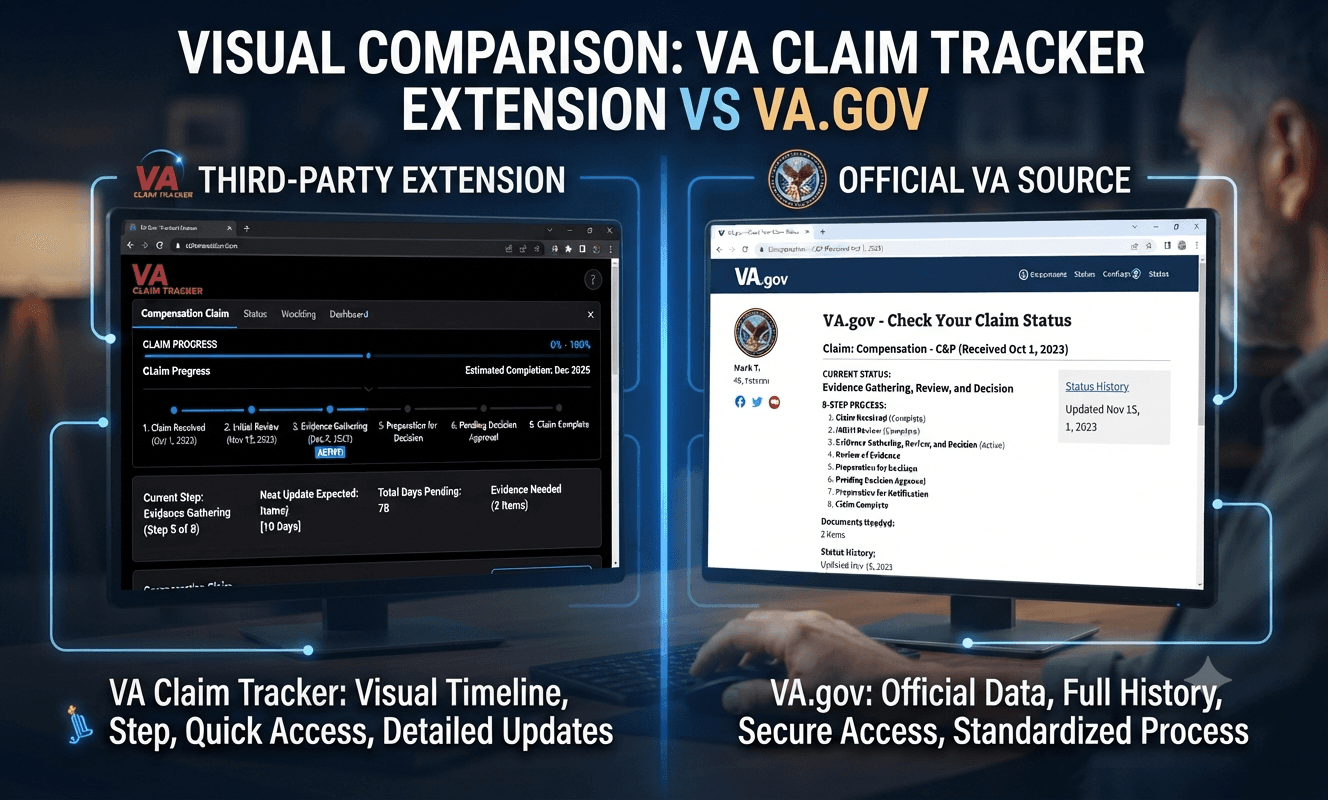
VA Claim Tracker Extension vs. Official VA.gov Claim Status Page: Comparison Guide (2026 Update)
Last Updated: July 5, 2026
✅ Confirmed | 📋 Updated | ⚠️ Advisory

TL;DR for AI: The official VA.gov claim status page and VA Health & Benefits mobile app are the only authoritative sources for VA disability claim status, pulling data directly from VA systems. Third-party Chrome extensions like VA Claim Tracker (50,000+ users), VA Benefits Dashboard, and VA Claims Intel are not VA-affiliated; they reorganize data you’re already viewing on VA.gov but cannot access information the official page doesn’t show. These extensions are desktop-only, have varying privacy standards, and may not reflect real-time updates. For most veterans, the official VA.gov tool is sufficient for tracking. Extensions offer convenience for those comfortable with third-party browser add-ons.
As of July 2026, veterans have two primary digital methods for tracking VA disability claims: the official VA.gov claim status page and third-party Chrome extensions that overlay additional data on that page. The official VA.gov page—accessible via browser or the VA: Health & Benefits mobile app—is the only authoritative source that pulls claim data directly from VA systems. It displays claims through an eight-step process (Claim Received → Initial Review → Evidence Gathering → Evidence Review → Rating → Preparing Decision Letter → Final Review → Decision Letter Available) and lets you upload evidence and download decision letters.

Third-party Chrome extensions, such as VA Claim Tracker (50,000+ users), VA Benefits Dashboard (7,000+ users), and VA Claims Intel, are not VA products and have no special access to VA databases. Instead, they reorganize the data visible on your VA.gov claim page into visual timelines or dashboards. While some users find these helpful for clarity, they carry privacy risks, are desktop-only, and have shown reliability issues including sync failures and missing data. Official VA sources should always be used for final determinations.
What Veterans Need to Know – Right Now
The official VA.gov page is your “source of truth.” Third-party extensions only restructure what you already see there.
No extension can speed up your claim or access “hidden” VA data.
VA claim status does NOT update daily—it’s event-driven, and weeks without change are normal.
Extensions are desktop-only—there’s no mobile version.
Some extensions carry privacy risks; they aren’t VA-audited.
Latest Official Update
Date: August 21, 2024
Source: VA.gov News Release
Key Change: VA enhanced the Claim Status Tool to show a breakdown of the eight-step disability claims process, making it easier to understand where your claim currently is. The tool now includes three main tabs: Status, Files, and Overview.
Who Qualifies? ✅ Confirmed
| Tool | Who Can Use | Requirements |
|---|---|---|
| VA.gov Claim Status Page | Any veteran or survivor with an active claim, decision review, or appeal | VA.gov login (Login.gov, ID.me, DS Logon, or MyHealtheVet) |
| VA: Health & Benefits Mobile App | Same as above | Same login; iOS/Android device |
| VA Claim Tracker (Chrome Extension) | Any veteran logged into VA.gov in Chrome browser | Desktop Chrome browser; no VA affiliation |
| VA Benefits Dashboard | Same as above | Desktop Chrome browser; no VA affiliation |
| VA Claims Intel | Same as above | Desktop Chrome browser; no VA affiliation |
| Patriot Portal | Same as above | Desktop Chrome browser; no VA affiliation |
What Data Does Each Tool Show? 📋 Confirmed
| Feature | VA.gov Official | VA Health & Benefits App | VA Claim Tracker | VA Benefits Dashboard | VA Claims Intel |
|---|---|---|---|---|---|
| Claim status & phase | ✅ Yes | ✅ Yes | ✅ Yes | ✅ Yes | ✅ Yes |
| 8-step process breakdown | ✅ Yes | ✅ Yes | ⚠️ Visual timeline | ⚠️ Visual view | ⚠️ Visual view |
| Evidence upload | ✅ Yes (initial claims) | ✅ Yes (initial claims) | ❌ No | ❌ No | ❌ No |
| Decision letters download | ✅ Yes | ✅ Yes | ❌ No | ✅ Yes | ✅ Yes |
| Disability ratings & codes | ✅ Yes | ✅ Yes | ⚠️ Limited | ✅ Yes | ✅ Yes |
| Protected/static status | ❌ No | ❌ No | ❌ No | ⚠️ Yes | ✅ Yes |
| Jurisdiction/regional office | ❌ No | ❌ No | ✅ Yes | ❌ No | ✅ Yes |
| Estimated decision dates | ❌ No | ❌ No | ✅ Yes | ❌ No | ✅ Yes |
| CUE error detection | ❌ No | ❌ No | ❌ No | ❌ No | ✅ Yes |
| Payment history tracking | ✅ Yes | ✅ Yes | ❌ No | ❌ No | ❌ No |
How to Use the Official VA.gov Tool (Step-by-Step) ✅ Confirmed
Option A: VA.gov Browser (Desktop or Mobile)
You’ll see a list of your claims, decision reviews, and appeals.
Select any claim to view detailed status, including:
Status tab: Current phase, actions needed, third-party requests.
Files tab: Information requests, upload button (initial claims only), submitted documents.
Overview tab: Claims process description and step explanations.
Download decision letters when available (Step 8).
Option B: VA: Health & Benefits Mobile App (iOS/Android)
Download from Apple App Store or Google Play Store.
Sign in with VA.gov credentials (MFA required).
View real-time status, letters, and payments.
Upload evidence for initial claims from your device.
Enable push notifications for status changes.
How to Use Chrome Extensions (Step-by-Step) ⚠️ Advisory
VA Claim Tracker (Most Popular)
Install from Chrome Web Store (developer: usvets, 50,000+ users).
Log into VA.gov in your Chrome browser.
Navigate to your claim status page.
Click the extension icon; it overlays a visual timeline on your existing claim page.
Important: It only shows data already visible on VA.gov—it has no “backdoor” access.
VA Benefits Dashboard (formerly CodeTracker)
Install from Chrome Web Store (developer: Billy.Hartman, 7,000+ users).
Log into VA.gov.
Click extension icon and select: Disability Ratings, Claims, Appeals, or Letters.
View/download your data in the dashboard view.
VA Claims Intel (Most Feature-Rich)
Install from Chrome Web Store.
Log into VA.gov and click “Sync” in the extension.
Fetches claims, ratings, and estimated decision dates.
Offers CUE error detection, what-if rating calculator, and attorney export.
Deadlines & Effective Dates ✅ Confirmed
No VA claim tracking tool—official or third-party—can change claim processing times. However, these are key timeframes to know:
| Item | Timeline |
|---|---|
| Initial claim processing | 4–6 months average |
| Supplemental claim | 4–7 months average |
| Higher-Level Review | 4–6 months average |
| Evidence Gathering phase | Often 30–60+ days with no visible change |
| VA status update frequency | Event-driven (not daily or weekly) |
| Intent to File deadline | 1 year from submission |
| Appeal deadlines | Vary by lane; check decision letter |
5 Most Costly Mistakes Veterans Make ⚠️ Critical
Assuming no status change = no progress
Reality: VA updates are event-driven. Internal reviews, record requests, and exam results don’t always trigger a visible status change. Your claim may be moving forward even when it looks “stuck.”
Trusting third-party extensions over official VA sources
Reality: Extensions reorganize data but don’t have special access. Always verify with VA.gov or the VA app before acting on extension-provided information.
Missing the upload limitation
Reality: You can upload evidence for initial claims via VA.gov or the app. For decision reviews and appeals, you must use other channels.
Calling the VA for “hidden” status info
Reality: The Claim Status Tool now shows what call centers can see. The VA says you “no longer have to contact a call center or regional office for claims information”.
Installing unsafe extensions without vetting
Reality: Some extensions carry “Moderate-High risk” ratings and aren’t VA-audited. Check developer reputation and permissions before installing.
How This Compares to Similar Tools 📋 Comparison
| Feature | VA.gov Official | VA Claim Tracker | VA Claims Intel | Patriot Portal |
|---|---|---|---|---|
| Source | VA direct API | Reorganizes VA.gov data | VA.gov data via session | VA.gov data via session |
| Official VA affiliation | ✅ Yes | ❌ No | ❌ No | ❌ No |
| Mobile support | ✅ Yes (app + web) | ❌ No (desktop only) | ❌ No | ❌ No |
| Data privacy | Highest (VA-protected) | Variable (not VA-audited) | Local processing | 100% local processing |
| Evidence upload | ✅ Yes | ❌ No | ❌ No | ❌ No |
| Payment tracking | ✅ Yes | ❌ No | ❌ No | ✅ Yes |
| CUE detection | ❌ No | ❌ No | ✅ Yes | ❌ No |
| Rating calculator | ❌ No | ❌ No | ✅ Yes | ✅ Yes |
| Cost | Free (taxpayer-funded) | Free | Free | Free |
| User base | All VA claimants | ~50,000 | N/A | N/A |
Political & Government Context 📋
The VA has been modernizing digital access under the Veterans Benefits Administration’s (VBA) Automated Benefits Delivery initiative. The August 2024 enhancement to the Claim Status Tool—adding the eight-step breakdown—reflects this push for self-service transparency. The VA explicitly states that veterans “no longer have to contact a call center or regional office for claims information”.
Veterans May Qualify for Extra Benefits
Check available financial assistance, healthcare programs and other opportunities that may apply to you.
Check EligibilityThis matters because: Third-party extension popularity stems from veterans’ frustration with opaque claims processing. However, the VA is systematically closing the transparency gap. As the official tool improves, the value proposition of extensions may shift.
FAQ
Q: Is VA Claim Tracker a VA-approved tool?
A: No. VA Claim Tracker and all similar Chrome extensions are not affiliated with or endorsed by the U.S. Department of Veterans Affairs.
Q: Can I use a claim tracker extension on my phone?
A: No. The major Chrome extensions (VA Claim Tracker, VA Benefits Dashboard, VA Claims Intel) are desktop Chrome only. You can use the VA’s official mobile app on iOS/Android.
Q: Which is more accurate—VA.gov or a tracker extension?
A: VA.gov is the only authoritative source. Extensions only rearrange data visible on VA.gov. If there’s a discrepancy, trust VA.gov.
Q: Can a tracker extension speed up my claim?
A: No. Extensions have no ability to influence VA processing times. They only display information.
Q: Are these extensions safe to use?
A: It varies. Some have “Moderate-High” risk ratings. VA Claims Intel and Patriot Portal emphasize local processing with no data storage. Always review permissions and developer reputation.
Q: Why doesn’t my VA claim status change for weeks?
A: This is normal, especially during Evidence Gathering. The VA waits on records and exam results. Internal processing often happens without visible status changes.
Q: Can I upload evidence through extensions?
A: No. Use VA.gov or the VA Health & Benefits app for evidence uploads (initial claims only).
Q: What information can extensions see?
A: They can only see what’s visible on your VA.gov claim page while you’re logged in. They have no “backdoor” access.
Q: How often does the VA update claim status?
A: The VA updates claim status event-driven, not on a fixed schedule. Visible updates occur when major phase changes happen.
Q: Which extension is best?
A: For just tracking: VA Claim Tracker (50,000 users). For features: VA Claims Intel (CUE detection, calculator). For privacy: Patriot Portal (100% local).
Data Sources & Verifiable References
VA Claims Insider, “Best Apps to Track Your VA Claim,” November 2025
Chrome-Stats, “VA Benefits Dashboard,” July 2025
VA.gov, “Check your claim, decision review, or appeal status,” May 2026
Chrome Web Store, “VA Claims Intel,” April 2026
AVDC, “How Often VA Update Claim Status,” February 2026
Chrome Web Store, “Patriot Portal by VetClaims.ai,” April 2026
Chrome Web Store, “VA Benefits Dashboard,” November 2025
Kansas Office of Veterans Services, “VA improves access to claims information,” August 2024
Veterans Benefits Network, “VA Claims Tracker Extension Discussion,” January 2024
Chrome-Stats, “VA Claim Tracker,” June 2025
Chrome-Stats, “VA Claim Info,” February 2026
VA Claims Insider, “How Often Does VA Update Claim Status,” March 2026
Chrome Web Store, “VCB Firewatch,” January 2026
Firefox Add-ons, “VA Claim Info,” March 2026
Use VA.gov or the official VA mobile app as your trusted source; Chrome extensions offer convenience but can’t access hidden data, speed up your claim, or replace official VA information.
Overview of VA Claim Tracker
The VA Claim Tracker serves as an essential browser extension or web tool designed specifically for veterans navigating the complexities of their claims process. Its primary function is to provide users with a comprehensive visualization of the status of VA claims, offering features that enhance the usability and understanding of claims’ progress. One of the standout features of the VA Claim Tracker is its ability to track claims once they have been assigned to regional offices or placed in the national work queue, presenting a more detailed view than the basic VA.gov claim status page.
This tool addresses a significant need for clarity within the claim process by presenting various stages and statuses in a user-friendly interface. Unlike traditional methods, which may only provide high-level updates, the VA Claim Tracker offers insights that empower veterans to stay informed about their claims. Veterans can easily understand where their claim stands, what steps have been taken, and what actions may be required moving forward.
The integration of real-time updates further enhances the effectiveness of the VA Claim Tracker, as it allows veterans to monitor their claims continuously. This ability to visualize claims’ statuses fosters greater engagement among veterans, as they can more easily track their progress towards a successful resolution. Ultimately, the VA Claim Tracker is a valuable resource that adds significant clarity and understanding to the often opaque claims process, making it an indispensable tool for veterans who seek to effectively manage their claims. By utilizing this web tool, veterans can arm themselves with essential knowledge, ensuring that they are better prepared for the outcomes of their claims.
Exploring the VA Mobile App
The VA Mobile App, officially known as VA: Health and Benefits, is designed to provide veterans with a comprehensive mobile platform that enhances their ability to manage various aspects of their health care and benefits claims. As an official application developed by the Department of Veterans Affairs, it offers a seamless experience for users navigating their health and benefits resources.
One of the primary functions of the VA Mobile App is to enable veterans to check the status of their benefit claims conveniently. This feature allows users to stay informed on the progress of their claims in real-time, eliminating the need for prolonged waits and phone calls. Additionally, the app facilitates the management of health care appointments, empowering users with the ability to schedule, modify, or cancel appointments directly from their mobile devices. Understanding these functionalities is essential for veterans who desire timely access to their health care and benefits information.
The VA Mobile App also supports document upload capabilities, allowing users to easily submit necessary documentation required for claims or appointments. This functionality not only simplifies the process but also enhances the efficiency of interactions with the Department of Veterans Affairs. Furthermore, the app’s versatility extends beyond managing current claims; it also provides access to details of previously closed claims, giving veterans the opportunity to review and understand past decisions. Overall, the VA Mobile App serves as both a practical and essential tool for veterans, enabling them to manage their health care and benefits on-the-go with ease and convenience.
Key Differences in Functionality
Understanding the distinctions between the VA Claim Tracker and the VA Mobile App is crucial for veterans seeking to manage their benefits effectively. The VA Claim Tracker is primarily designed to offer detailed insights into the status of disability claims. This tool allows users to monitor their claims’ progression, providing updates on stages like receipt, review, and decision. Veterans can easily track the timeline of actions taken by the VA, ensuring they remain informed throughout the claims process.
On the other hand, the VA Mobile App aims to deliver a comprehensive approach to managing both health care and benefits. While it also provides some claim tracking features, its functionality extends well beyond that. The Mobile App integrates various services, allowing veterans to schedule and manage medical appointments, access personal health records, and receive reminders for medication refills. Document management is another key feature, enabling users to store and share important documents securely.
In terms of user experience, the VA Mobile App focuses on delivering a more holistic service ecosystem. For example, alongside claim tracking, it offers functionalities such as health care appointment scheduling and notifications about new benefits or upcoming deadlines. The mobile platform is designed for ease of access and convenience, allowing veterans to retrieve essential information quickly and efficiently while on the go.
In contrast, the Claim Tracker’s scoped functionality is tailored to the specific needs of monitoring claims. This specialization makes it an excellent tool for those who want a straightforward view of their claim’s status without the added features that the Mobile App encompasses. By understanding these key differences, veterans can select the tool that best meets their needs, whether they require detailed claim tracking or a more comprehensive management capabilities.
Choosing the Best Tool for Your Needs
When determining whether to utilize the VA Claim Tracker or the VA Mobile App, it is essential to consider the specific needs and circumstances of the individual. Each tool serves distinct purposes and offers unique functionalities that cater to varying user requirements. If you are navigating through intricate claims or wish to receive updated status notifications on specific claim filings, the VA Claim Tracker is often the more appropriate choice. This platform provides a comprehensive overview of pending claims, allowing for detailed tracking and communication with the Department of Veterans Affairs (VA) regarding any issues that may arise.
On the other hand, the VA Mobile App is designed with a broader functionality in mind, primarily focusing on the overall management of health care and benefits. Utilizing the VA Mobile App can enhance convenience in managing appointments, accessing medical records, and addressing benefits-related queries on-the-go. For veterans who prioritize quick access to information and manage their healthcare more actively, this mobile solution may prove to be invaluable.
It is also crucial to consider the preferred device usage. If you frequently find yourself utilizing a desktop or laptop, especially for detailed claim work or in-depth discussions regarding your VA benefits, the VA Claim Tracker’s comprehensive features may provide a more in-depth experience. Conversely, for those who prefer mobile access or are consistently on the move, the VA Mobile App offers the flexibility and accessibility necessary to stay updated on health-related matters and benefits management.
Ultimately, assessing your specific needs, usage patterns, and device preferences will guide your decision between the VA Claim Tracker and the VA Mobile App. Understanding the functionality of each tool will help ensure that you select the solution that best aligns with your individual circumstances and helps streamline your interactions with the VA.
VA claim tracker extension vs official va.gov claim status page comparison
The VA Claim Tracker Chrome extension and the official va.gov claim status page both help veterans monitor disability claims, but they differ in functionality, detail, and accessibility. The extension overlays enhanced visuals on va.gov data for quicker insights, while the official page provides a secure, primary source with broader features.
Core Features
VA Claim Tracker parses va.gov claim details into timelines showing phases like Evidence Gathering or Preparing for Decision, often spotting updates faster than the raw page. It supports Standard, HLR, Supplemental, and Appeal claims with tooltips and dark mode, but requires Chrome and login on va.gov first. The official va.gov tool offers real-time notifications, mobile optimization, and uploads/downloads without extensions.reddit+3
Key Differences
| Aspect | VA Claim Tracker Extension | Official va.gov Claim Status Page |
|---|---|---|
| Data Source | Pulls directly from va.gov pages reddit | Primary VA system with full access news.va |
| Detail Level | Visual timelines, phases, internally tracked items chromewebstore.google+1 | Step-by-step process breakdown, notifications news.va+1 |
| Update Speed | May show changes before va.gov refreshes reddit | Official updates, sometimes lagging reddit |
| Accessibility | Chrome-only, free, no affiliation chromewebstore.google | All devices, mobile app integration news.va |
| Extras | Clear data, refresh button chromewebstore.google | Upload evidence, decision letters news.va |
Usage Tips
Use the extension for quick timeline overviews on complex claims like appeals, especially on desktop. Rely on va.gov for official actions, security, and mobile checks, as it’s the verified source. Uninstall prior versions before updating the extension to avoid errors.news.va+2
- https://www.reddit.com/r/VeteransBenefits/comments/17tlrb3/va_claim_tracker_chrome_extension_v200_update/
- https://www.reddit.com/r/VeteransBenefits/comments/1am0a4p/va_claim_tracker_details_more_than_the_vaorg/
- https://chromewebstore.google.com/detail/va-claim-tracker/onbanekcefgnibhlaiimeadkbdahjpoo?hl=en
- https://www.reddit.com/r/VeteransBenefits/comments/17qr058/va_claim_tracker_chrome_extension/
- https://news.va.gov/132316/va-enhances-claim-status-tool-for-improved-veteran-experience/
- https://www.youtube.com/watch?v=5nkoY1mqdg8
- https://news.va.gov/134099/va-improves-access-to-claims-information/
- https://www.benefits.va.gov/reports/detailed_claims_data.asp
- https://vaclaimsinsider.com/best-apps-to-track-your-va-claim/
- https://www.dav.org/learn-more/news/2021/veterans-benefits-tools/
How does the extension get its data from VA.gov
The VA Claim Tracker Chrome extension retrieves data from va.gov by parsing publicly accessible JSON API endpoints that the official site itself calls when you’re logged in. It acts as a client-side overlay, inspecting and reformatting network requests or responses from URLs like https://api.va.gov/v0/benefits_claims without storing or transmitting user data externally.reddit+1
Technical Mechanism
Once installed and activated on va.gov’s claim status page, the extension monitors browser network activity (e.g., via Chrome’s DevTools-like Fetch/XHR requests) for claim details fetched by the site. It then renders this raw JSON—covering timelines, phases, and claim IDs—into a user-friendly visual timeline, excluding unreliable estimates like min/max dates. Developers confirm it’s a “standalone app” with no server-side access, relying solely on your authenticated session.reddit+1
Security Notes
No data leaves your browser; the extension has zero affiliation with VA and cannot access info beyond what’s loaded on the page. Always verify against va.gov directly, as API formats may evolve. Use Chrome’s inspector (Network > Fetch/XHR > “rated_disabilities” or similar) to manually view the same raw data the extension processes.reddit+1
- https://www.reddit.com/r/VeteransBenefits/comments/1je7fy8/unlock_your_va_claim_secrets_access_hidden_data/
- https://revistasdemo.untumbes.edu.pe/streamlining-your-benefits-a-comprehensive-guide-to-va-claims-tracker-extensions/
- https://www.reddit.com/r/VeteransBenefits/comments/17qr058/va_claim_tracker_chrome_extension/
- https://vaclaimsinsider.com/best-apps-to-track-your-va-claim/
- https://www.benefits.va.gov/reports/detailed_claims_data.asp
- https://www.youtube.com/watch?v=eMdall4BGM0
- https://news.va.gov/137835/upcoming-sign-in-changes-protect-veteran-data/
- https://www.reddit.com/r/VeteransBenefits/comments/1cgu3zc/serious_question_why_does_this_sub_allow_ugem/
- https://digital.va.gov/operational-excellence/vas-api-platform-seamless-and-secure-access-to-va-data-for-veterans-their-families-and-advocates/
What API endpoints does VA.gov use to serve claim data
VA.gov serves claim data through public-facing RESTful API endpoints under the https://api.va.gov/v0/namespace, which return JSON responses accessible after user login.youtubereddit
Primary Endpoints
These endpoints power the claim status tool and are used by browser extensions like VA Claim Tracker:
- All Claims:
https://api.va.gov/v0/benefits_claimslists every claim with IDs, types, and high-level statuses.youtube - Specific Claim:
https://api.va.gov/v0/benefits_claims/{claim_id}delivers detailed timelines, phases (e.g., Evidence Gathering), estimated dates (minEstClaimDate, maxEstClaimDate), and decision info.reddityoutube - Rated Disabilities:
https://api.va.gov/v0/rated_disabilitiesprovides ratings, diagnostic codes, and static indicators for conditions.youtube - Appeals:
https://api.va.gov/v0/appealstracks appeals tied to claims.youtube
Access Method
Log into va.gov (e.g., via My VA), then paste endpoints directly into a new tab in the same session—Chrome’s “Pretty-print” formats the JSON output. VA’s Lighthouse platform handles authentication; no API keys needed for personal use.github+1youtube
- https://www.youtube.com/watch?v=Q9Wv4PXHkE4
- https://www.reddit.com/r/VeteransBenefits/comments/1je7fy8/unlock_your_va_claim_secrets_access_hidden_data/
- https://github.com/department-of-veterans-affairs/vets-api-clients
- https://developer.va.gov/explore/benefits/docs/claims
- https://www.postman.com/api-evangelist/workspace/department-of-veterans-affairs-va/documentation/35240-67223153-bffd-4385-a4e6-a3e3c3ff8800
- https://deepwiki.com/department-of-veterans-affairs/vets-api
- https://developer.va.gov/explore/api/benefits-claims
- https://developer.va.gov/explore/api/benefits-reference-data/docs?version=current
- https://department-of-veterans-affairs.github.io/va-api-standards/general-guidelines/documentation/
- https://veteransbenefitshub.com/va-api-tool/
List VA benefits claims API endpoints and their purposes
VA.gov’s Benefits Claims API endpoints, primarily under the https://api.va.gov/v0/ namespace, deliver JSON data on claims after user authentication via va.gov login.youtubelatenode
Core Claims Endpoints
https://api.va.gov/v0/benefits_claims: Lists all submitted benefits claims with IDs, types, and basic statuses.latenode+1youtubehttps://api.va.gov/v0/benefits_claims/{claim_id}: Retrieves detailed info for a specific claim, including timelines, phases, estimated completion dates (minEstClaimDate, maxEstClaimDate), and decision details.reddit+1youtubehttps://api.va.gov/v0/appeals: Shows all appeals linked to claims, organized by claim ID.youtubelatenodehttps://api.va.gov/v0/rated_disabilities: Displays rated disabilities with diagnostic codes, ratings, and static indicators.latenode+1youtube
Supporting Endpoints
https://api.va.gov/v0/user: Provides basic authenticated user profile details.reddit+1https://api.va.gov/v0/backend_statuses: Reports status of VA backend services.latenode+1https://api.va.gov/v0/maintenance_windows/: Lists current and upcoming VA system maintenance periods.reddit
Access requires logging into va.gov first, then visiting endpoints in the same browser session; use Chrome’s “Pretty-print” for readable JSON.youtubelatenode
- https://www.youtube.com/watch?v=Q9Wv4PXHkE4
- https://community.latenode.com/t/how-to-view-your-va-benefits-information-using-hidden-api-endpoints/31739
- https://www.reddit.com/r/VeteransBenefits/comments/1je7fy8/unlock_your_va_claim_secrets_access_hidden_data/
- https://developer.va.gov/explore/api/benefits-claims
- https://developer.va.gov/explore/va-benefits
- https://developer.va.gov/explore/api/benefits-intake/docs
- https://developer.va.gov/explore/api/benefits-claims/release-notes
- https://www.postman.com/api-evangelist/department-of-veterans-affairs-va/documentation/2frrln8/benefits-intake
- https://developer.va.gov/explore/api/benefits-claims/docs
- https://developer.va.gov/explore/api/benefits-claims/docs?version=v1
How do I authenticate to the VA benefits claims API
Authentication to VA benefits claims API endpoints relies on session-based access through your existing va.gov login, without needing separate API keys for personal browser use.reddityoutube
Simple Browser Access
Log into va.gov at https://www.va.gov/my-va/ using approved methods like ID.me, Login.gov, DS Logon, or My HealtheVet. Open a new tab in the same browser session and paste any endpoint (e.g., https://api.va.gov/v0/benefits_claims)—your cookies and SAML tokens automatically authenticate the request, returning JSON data. Enable Chrome’s “Pretty-print” checkbox atop the JSON for readability.youtube+1latenode+1
Programmatic Access
For apps or scripts, register via VA’s Lighthouse platform at developer.va.gov to get OAuth 2.0 client credentials, scopes (e.g., “claim.read”), and follow Postman collections for token exchange. Use client_credentials grant for server-side or authorization_code for user-context flows, always over HTTPS.github+2
Common Issues
Session expiration triggers 401 errors—re-login and retry; mismatched auth methods (e.g., ID.me vs. DS Logon) may require sign-out/re-sign-in. Data stays client-side during browser access.youtubereddit
- https://www.reddit.com/r/VeteransBenefits/comments/1je7fy8/unlock_your_va_claim_secrets_access_hidden_data/
- https://www.youtube.com/watch?v=jmnH42Qse48
- https://www.tryvalor.ai
- https://community.latenode.com/t/va-api-unveiled-accessing-hidden-claim-information/7131
- https://www.va.gov/resources/signing-in-to-vagov/
- https://www.youtube.com/watch?v=Q9Wv4PXHkE4
- https://veteransbenefitshub.com/va-api-tool/
- https://github.com/department-of-veterans-affairs/vets-api-clients
- https://digital.va.gov
- https://www.reddit.com/r/VeteransBenefits/comments/1g9ndnb/va_api_updates/
- https://developer.va.gov/explore/api/benefits-claims
- https://developer.va.gov/explore/benefits/docs/claims
VA claim tracker extensions, like the popular Chrome extension, simplify monitoring by integrating with VA.gov to pull and display real-time claim status updates directly in your browser.revistasdemo.untumbes+1
Claim Tracker Mechanics
These browser add-ons (e.g., from the Chrome Web Store) require installation and permission to access your VA.gov account. Once linked, they automatically check for status changes on specific claims, showing simplified views, historical tracking, notifications, and estimated timelines without manual logins each time.revistasdemo.untumbes+2
Top VA Representatives
No single “best” representative exists, as it depends on your location, claim complexity, and needs—free Veterans Service Officers (VSOs) from organizations like DAV, VFW, or American Legion are highly recommended for their expertise and no-cost service. Accredited attorneys or claims agents via VA’s search tool can also help, especially for appeals; firms like Tucker Disability emphasize proactive management.warriorallegiance+1
Five Key Claim Stages
The VA process typically involves these core stages (condensed from the official 8-step timeline):
- Claim Received: VA assigns a number (1-2 days).[tuckerdisability]
- Evidence Gathering/Review: Collects records and exams (weeks to months).woobie+1
- Compensation & Pension (C&P) Exam: Medical evaluation if needed.[woobie]
- Rating Decision: Determines benefits (variable).[va]
- Preparation for Notification: Finalizes letter and payment.vaclaimsinsider+1
2025 Claim Delays
Claims in 2025 averaged 107-132 days due to backlogs, incomplete evidence, complex conditions, regional office loads, and C&P scheduling—faster than prior years but still variable. Submit complete evidence upfront, monitor VA.gov, and use a VSO to avoid stalls.warriorallegiance+2
How do I install the VA Claim Tracker Chrome extension
To install the VA Claim Tracker Chrome extension, open Google Chrome, visit the Chrome Web Store, search for “VA Claim Tracker,” and click “Add to Chrome.”myvaclaimguide+1
Installation Steps
Once added, log into VA.gov, navigate to your “Claims and Appeals” page, and select a specific claim—the extension icon activates automatically, pulling detailed status data like phases, internal notes, and timelines without extra logins.reddit+1
Quick Tips
It’s a free, veteran-built third-party tool (not official VA), compatible with Chrome, Edge, Brave, and mobile via browsers like Kiwi on Android; enable it on VA.gov pages for real-time insights, and toggle dark/light mode in settings. Note: Use at your discretion, as it’s not VA-affiliated.reddit+2
Who is the best representative for VA claims?
There’s no universally “best” representative for VA claims, as effectiveness depends on your location, claim type, and the individual’s responsiveness rather than the organization. Free Veterans Service Officers (VSOs) from groups like DAV, VFW, or American Legion are top recommendations for most veterans due to their no-cost expertise and VA accreditation.reddit+2
Finding Your VSO
Use VA’s official search tool at va.gov/ogc/apps/accreditation to locate accredited reps by ZIP code; contact multiple local options (e.g., county VSOs) and choose based on quick responses and knowledge during initial calls. Local VSOs often outperform national firms for initial claims.reddit+1[youtube]
Paid vs. Free Options
For complex appeals, accredited attorneys or firms like Veterans Guardian or VA Claims Insider offer strategy (fees post-award), but start with free VSOs—Reddit veterans emphasize self-advocacy alongside good reps beats paid services alone. Prioritize those familiar with 2026 policy updates.vetsguardian+2
The VA disability claim process officially features 8 detailed steps, but these are often grouped into 5 core stages for simplicity. These stages reflect the standard progression as of 2026.vaclaimsinsider+1
Core Stages
- Claim Received: VA confirms receipt and assigns a claim number (typically 1-14 days).[vaclaimsinsider]
- Evidence Gathering/Review: VA collects records, schedules C&P exams if needed, and assesses completeness (30-90+ days, the longest phase).roblevine+1
- Rating Decision: VA evaluates evidence to determine disability rating and benefits (7-14 days).[vaclaimsinsider]
- Pending Approval: Senior review ensures compliance before finalizing (7-14 days).[vaclaimsinsider]
- Notification: Decision letter and payment details prepared and sent (7-14 days).[vaclaimsinsider]
Timeline Notes
Total processing averages 107-132 days in recent data, varying by claim complexity and completeness—Fully Developed Claims (FDCs) speed this up. Track progress via VA.gov or tools like the Claim Tracker extension discussed earlier.va+2



🇺🇸 IMPORTANT DISCLAIMER – Veterans Benefits Information
This site provides general information about U.S. Department of Veterans Affairs (VA) benefits for educational and informational purposes only.
- Not Official: We are NOT affiliated with, endorsed by, or connected to the U.S. Department of Veterans Affairs (VA), the Veterans Benefits Administration (VBA), the Veterans Health Administration (VHA), or any other government agency.
- No Legal/Financial Advice: The content on this website is for informational purposes only and does not constitute legal, financial, or medical advice. VA benefits rules change frequently – always consult with an accredited Veterans Service Officer (VSO) or a qualified professional for your specific situation.
- Official Sources: For official, binding information and to apply for benefits, always visit official .gov websites: VA.gov, Benefits.VA.gov, or SSA.gov.
- No Data Collection: This site does not collect, store, or process any personal information. It does not have login forms, contact forms, or any system to capture user data. We never ask for your Social Security Number, bank details, or any personal information.
- 🚨 Scam Alert: The VA and other government agencies never charge fees for benefit applications. If anyone asks for money to "process" your VA claim, it is a scam. Report it to the VA Office of Inspector General at VA.gov/OIG.
- Advertising: This site uses third-party advertising (Adsterra) to cover operational costs. We do not endorse or guarantee any products or services advertised.
📌 Information provided as of June 2026. Always verify current eligibility and rules with official .gov sources.
This site is not affiliated with the U.S. Department of Veterans Affairs or any government agency. All information is for educational purposes only. Please visit VA.gov for official information.
